Solutions / Usage Intelligence
Turn opaque AI activity into clear intelligence
Understand exactly how your teams are leveraging AI, what tools are driving value, and where risky exposures are occurring.
Talk to us about securing AIWho we work with







Why Harmonic for usage intelligence
See the work behind the workaround
Harmonic turns raw AI activity into strategic insight. We synthesise prompt data into tasks and use cases that reflect your business, and map both adoption patterns and sensitive data exposure to the context in which they occur.
01Risky tools
See where and why risky tools are used
When employees reach for unsanctioned tools, it's usually a signal about what's missing from the sanctioned ones. Harmonic maps risky tool use back to the specific use case driving it, so you can see the work behind the workaround.
Not every risk looks the same. Harmonic identifies the tool, the account type and the subscription plan, and ties all of it to the use case it supports, so you can prioritise the exposures that matter and sanction what employees clearly need.

02Value
Understand which AI investments deliver
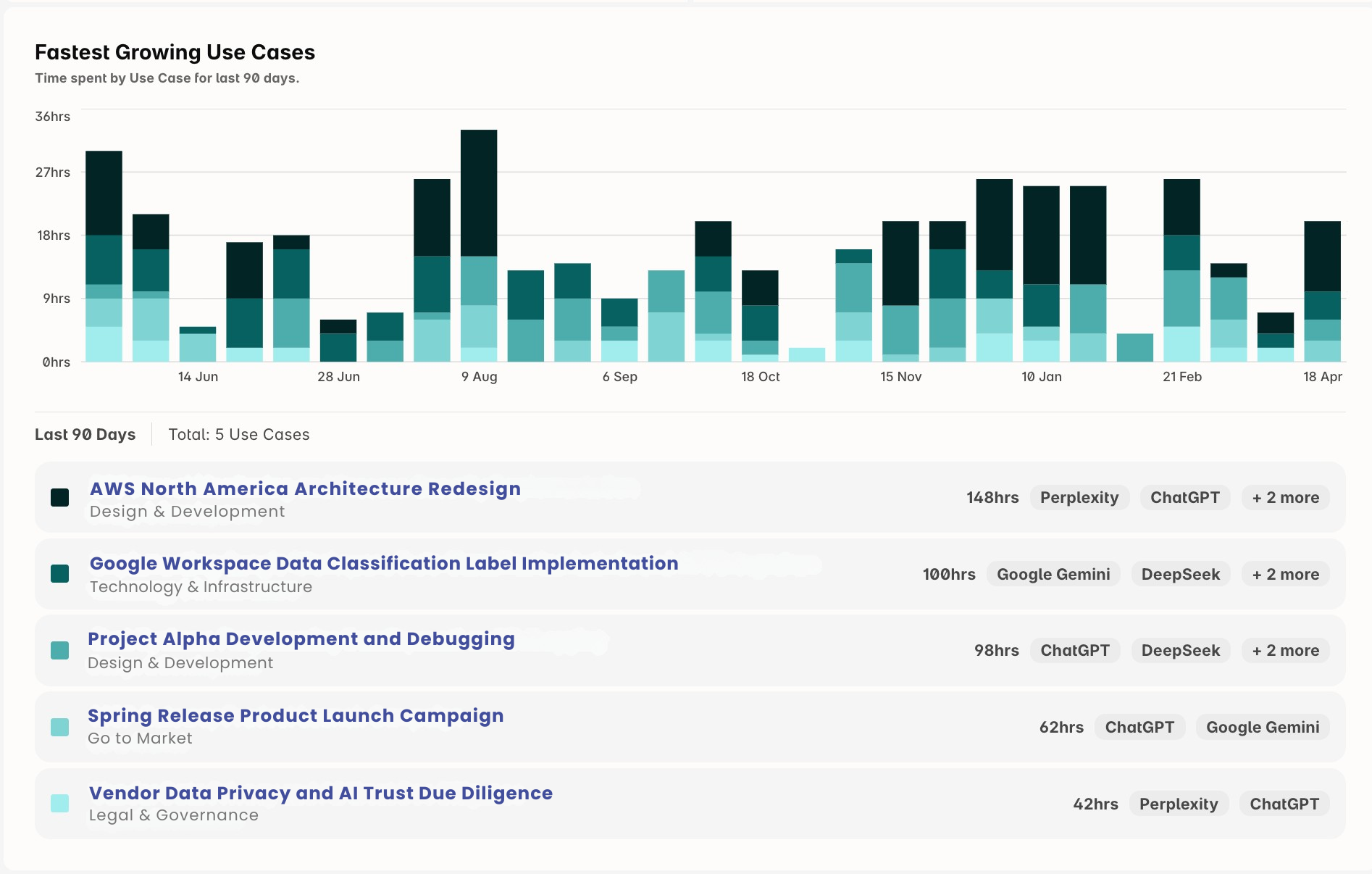
See exactly where AI is paying off: which use cases drive real productivity, which teams lead adoption, and how AI work trends across the business over time.
That takes the guesswork out of licence decisions, renewals and build-versus-buy calls. You know which sanctioned tools earn their spend, which are shelfware, and which emerging use cases deserve investment.
03Enablement
Pinpoint where employees need support
Every use case shows who's doing the work, which apps they use, and where they hit policy friction. That makes it easy to spot teams self-serving with AI effectively, and the ones that need help.
Target enablement where it will land: the right training, the right internal templates, and the sanctioned tools that actually solve the problem, instead of a generic policy reminder to the whole company.
.png)
Top resources
Resources for teams mapping AI usage
Data on how employees actually use AI at work, and how teams use Harmonic to act on it.
Research
2026 AI Usage Index report
1.9M minutes of AI activity, and why most work on personal accounts is business use.
Frequently asked questions
Quick answers about usage intelligence
Short, direct answers to what security and IT teams ask before bringing Harmonic in.
What is AI usage intelligence?
AI usage intelligence turns raw AI activity, such as prompts, files and agent actions, into a clear picture of what work employees use AI for, which tools they use for it, and where the risk sits. Harmonic Usage Intelligence groups interactions into tasks and tasks into use cases specific to your organisation, with views by department, employee, application, approval status and time.
How does Harmonic classify AI usage into use cases?
Harmonic's purpose-built small language models read the intent and context of each AI interaction, group related prompts into a single task, and then group tasks into use cases that reflect how your organisation works. The use cases come from your own activity, so a finance team sees “board variance commentary” rather than “writing”. Nobody has to define categories or tag prompts by hand.
Can Harmonic show which unsanctioned AI tools employees use, and why?
Yes. Usage Intelligence separates sanctioned from unsanctioned use and ties each unsanctioned tool to the use case it supports. You see the demand behind the workaround, so you can decide whether to sanction the tool, point people to an approved alternative, or add guardrails.
Does Usage Intelligence expose employees' raw prompts?
The Usage Explorer shows task summaries rather than raw prompts. Role-based access control limits who can see what, and you can exclude or mask employees and filter out personal conversations. Harmonic does not train on customer data.
Why can't security teams just block all AI tools?
AI is embedded in approved productivity tools like Google Translate, Microsoft Copilot and Salesforce, so blocking AI would block core business functions. Employees will also use personal devices and accounts when corporate access is restricted, creating greater shadow AI risk.
Do Netskope and Zscaler offer AI-specific controls?
Some SASE vendors offer limited AI controls for a small number of high-profile domains like ChatGPT or Copilot. Those controls require per-domain integrations and do not cover the full spectrum of AI tools, embedded AI features, or agentic workflows.
How is Harmonic Security deployed?
Harmonic can be installed with a range of MDM tools, such as Kandji, Intune or Jamf.

Get started
Build your AI guardrails on real usage
Gain the visibility and control you need to guide AI use with confidence. Most teams see first insight in about 30 minutes.
What you'll see with Harmonic Security
- Your full AI usage footprint: every surface, every team, every exposure.
- Inline guardrails that coach, warn, or block — firing in under 200ms.
- See and control what AI agents are actually doing.
- Coverage of browser, endpoint and MCP.
- Deployment in minutes via Intune, JAMF, or Kandji.
