
AI Has Gone Beyond the Browser, So Has Harmonic



AI Has Gone Beyond the Browser, So Has Harmonic
When ChatGPT launched in November 2022, it broke records. A million users in five days. A hundred million in two months. It was the fastest consumer application adoption in history, and enterprises weren't ready for any of it.
Security teams watched as their employees signed up for ChatGPT accounts on personal email addresses, pasted in customer data, drafted internal memos, and shared code with an API they had zero visibility into. It wasn't malicious. It was just faster than waiting for IT to approve something. Shadow AI was the default state of almost every organization on earth within six months of that launch.
What followed was a familiar pattern. Vendors scrambled to build AI policies into their DLP tools. CISOs issued guidance that nobody read. And slowly, over the course of 2023 and 2024, enterprises caught up — deploying browser-based controls, data classification layers, and prompt monitoring to get some grip on what was happening in tools like ChatGPT, Gemini, Copilot, and the hundreds of tools that multiplied in their wake.
For roughly three years, for most workforces using AI, the browser was the battlefield. If you could see what employees were typing into AI tools in Chrome and Edge, you could manage the risk. Security teams built workflows around that assumption. Harmonic built its earliest capabilities around it too.
That assumption no longer holds.
The moment AI moved off the tab
There have been desktop AI applications for a while. ChatGPT has had a Mac app since 2024. Various agent frameworks have existed in developer environments for even longer. But these were edge cases. Most enterprise AI usage still ran through a browser, and most security tools were built accordingly.
The shift became impossible to ignore with the launch of Claude Cowork. Not because Anthropic invented desktop AI, but because Cowork reframed what desktop AI actually means for the average knowledge worker. This wasn't a developer tool or a power-user experiment. It was a general-purpose AI agent sitting on your desktop, connected to your files, your calendar, your email, your Slack, your Notion, your CRM, with the ability to take actions across all of them.
Suddenly the conversation changed. Employees stopped knocking on IT's door asking for access to ChatGPT in the browser. They started asking for Cowork. And that difference matters more than it might seem.
Why desktop agents are a fundamentally different problem
A browser-based AI interaction has a natural ceiling. The user pastes in text, the model responds, and something sensitive might leave the building in that payload. That's the risk model security teams have been managing. It's a data exposure problem, and it's a meaningful one, but it's bounded.
An agentic desktop application changes the shape of the risk entirely. When an employee gives Cowork access to their local files, Google Drive, Gmail, and their Slack workspace, the questions quickly move beyond just just "what prompt did they send?"
What actions can this agent take on the user's behalf? Can it send emails? Create calendar invites with external attendees? Move files? Post to Slack channels? Write to the CRM? The answer, depending on the integrations and settings your organization has configured, could be yes to all of the above.
What skills is it running? Cowork and similar platforms support third-party skill packs. Some of those are entirely benign. Others connect to external services or execute code. Does the security team know which ones employees have installed?
What settings does it have? Can it search the internet? Can it write and execute scripts locally? Does it have access to credentials stored in the user's environment? These decisions are made during setup, often by the employee themselves, without security involved.
What data does it have access to? An agent with file system access, calendar access, and email access has a much richer picture of your organization than any single browser session. That picture exists in context, in memory, and in some cases in logs you can't audit.
None of this is a reason to block these tools. Organizations that try to prohibit them will simply drive adoption underground, which is exactly what happened in 2022. But it is a reason to change how you think about the problem.
This isn't an Anthropic story
Cowork getting mainstream traction doesn't mean every agentic AI deployment runs through Claude. OpenAI's Codex is executing code in cloud sandboxes. Perplexity has a computer use product. GitHub Copilot has moved well beyond autocomplete into full agentic coding workflows inside VS Code and JetBrains. Cursor and Windsurf are running in IDEs across engineering teams.
The pattern is consistent: AI has migrated from the browser into the applications where work actually happens. IDEs, desktop apps, local file systems, development pipelines, productivity suites. The browser is still relevant, but it's no longer the primary interface.
Securing interactions, not just prompts
The security conversation has to evolve with it. For three years, the framing has been about prompts: what sensitive data is getting included in a prompt, how to classify it, how to block it or alert on it. That framing made sense when AI was primarily a text box in a browser.
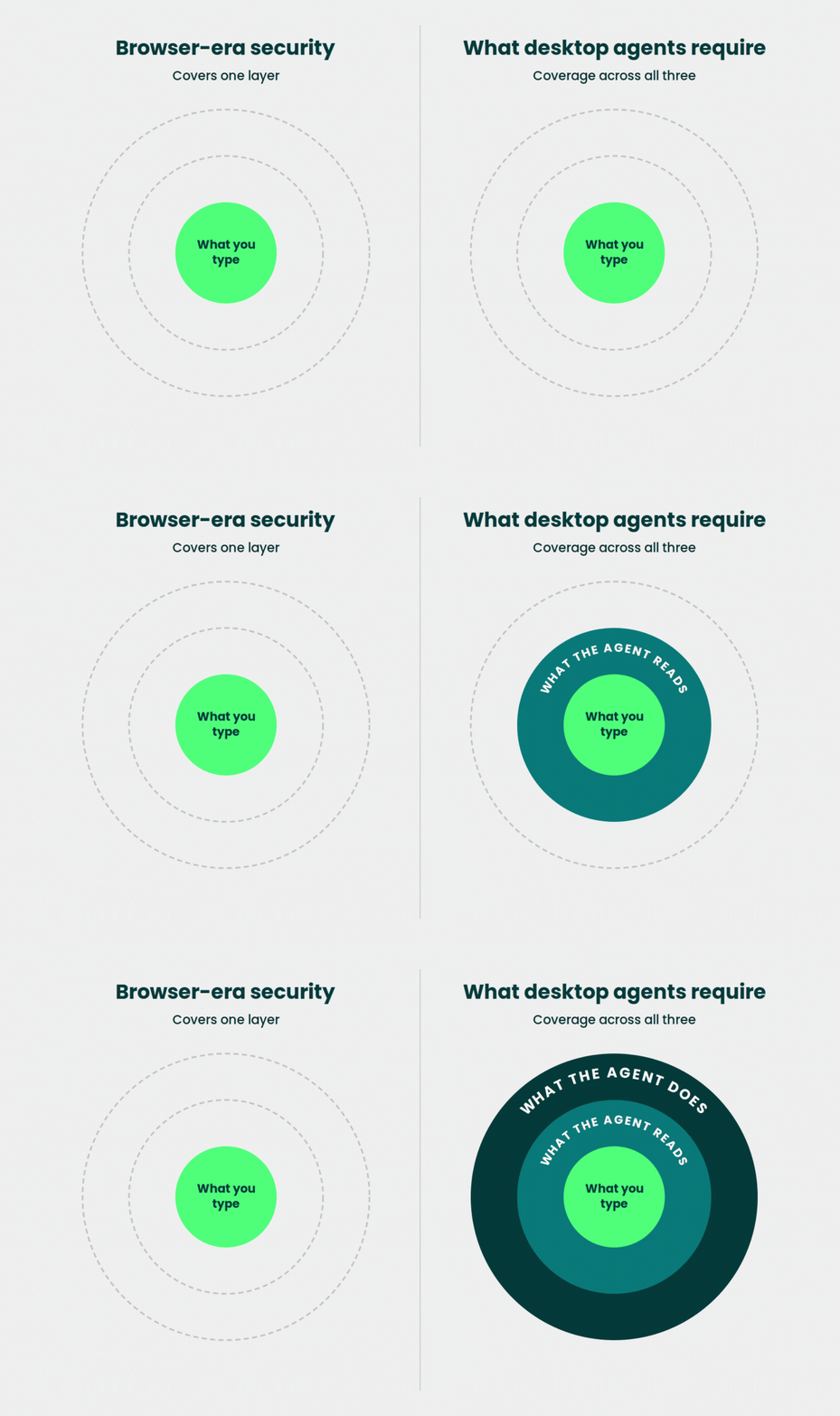
Agentic AI is not a text box. It's a process. It takes inputs, runs logic, calls APIs, takes actions, and produces outputs, often in sequence, often without the user reviewing each step. The relevant security question isn't only "what did the employee type?" It's "what did the agent do, on whose behalf, with what data, and to what external destination?"
That's a fundamentally different telemetry problem. It requires visibility into the agent's behavior along with the user’s input.
What Harmonic now covers
Harmonic's browser extension remains important. Browser-based AI usage hasn't gone away, and shadow AI through consumer tools is still a live risk in every organization. But browser coverage alone isn't enough anymore, and we've built accordingly.
The Harmonic endpoint agent covers the surface area that browsers can't reach. Desktop applications, including Cowork and other AI productivity tools. IDEs and coding agents. Direct calls to AI APIs made by scripts, automations, or internal tools. If an interaction involves an AI model and it's happening on a managed endpoint, Harmonic can see it.
The MCP gateway addresses a different part of the problem. Model Context Protocol has become the connective tissue of agentic AI, the standard that lets AI systems plug into tools and data sources. It's also where shadow agents show up, as employees configure their own AI workflows with connections to internal systems your security team didn't approve. The Harmonic MCP gateway lets you discover those agent configurations, understand what they're connected to, and route interactions through a controlled layer rather than trying to block them wholesale.
Together, these capabilities give security teams coverage across the full interaction surface.
What security teams should be doing right now
The organizations that handled the ChatGPT wave well were the ones that got ahead of it. They didn't ban it. They built visibility first, then policy, then controls. The same playbook applies today.
Start by understanding what agentic AI tools are actually running in your environment. Assume the answer is more than you think. Cowork, Copilot, Cursor, Windsurf, and a handful of other tools may already be present on your endpoints, used daily by engineers, salespeople, and operations teams who installed them without asking anyone.
Get visibility into what those agents are doing, not just what users are typing. The action log matters as much as the prompt log. What files did the agent read? What was sent to external endpoints? What APIs were called?
Map your MCP exposure. If your organization runs any internal tooling, any automation, or any developer infrastructure, there's a reasonable chance someone has already built an MCP server or connected an agent to it. That's not inherently a problem, but it should be a known quantity.
Harmonic has free resources to help teams work through this assessment.
- Audit Claude on MacOS and Windows: https://github.com/HarmonicSecurity/claudit-sec
- Audit OpenAI and Codex on MacOS: https://github.com/HarmonicSecurity/openai-audit
- Check skill files for risky behavior (runs locally on your browser): https://skill-scan.io/
If you're trying to build a framework for evaluating agentic AI risk in your environment, they're a useful starting point to then build controls on.
Taking a fresh approach
SASE and CASB were showing cracks before agentic AI arrived. Browser-based AI already pushed them past what they were designed for. Tools built to govern network traffic have no view of the prompt, no understanding of what's being shared or asked, and no context for whether a conversation represents a policy violation or routine work. They were flying blind at the prompt level before agents even entered the picture.
Agentic AI arrives and the whole frame needs replacing. When an agent can read your files, chain tasks, take actions, and run automations while everyone sleeps, the question was never which domain to allow.
The employees asking for Cowork aren't always filing IT requests. In a lot of organizations, the mandate is coming from the CEO.
The pace of all this is genuinely relentless. Harmonic is built to keep tempo with it.
.png)
.png)
