
Making Sense of the Agentic AI Landscape



Making Sense of the Agentic AI Landscape
If you went to RSAC this year, you already know: agentic AI security was everywhere. Every major vendor had a story about it. Every panel seemed to touch on it. But "agentic AI" means a lot of different things depending on who's talking, and the gap between marketing language and operational reality is wide.
What's changed is that agentic AI is no longer hypothetical. Claude Code and Cowork, Cursor, GitHub Copilot, and a growing list of tools are pushing agents directly into the enterprise, often without security teams having any say in the matter. Developers are using them today. Operations teams are building workflows with them today. PwC's 2025 survey of senior executives found that 79% of organizations are already adopting AI agents, with two-thirds reporting measurable productivity gains. Of those companies, 88% plan to increase their AI-related budgets in the next twelve months specifically because of agentic AI.
But the Cybersecurity Insiders AI Risk and Readiness Report 2026 tells the other side of the story: while 73% of organizations have deployed AI tools, only 7% have governance that enforces security and policy in real time. 37% of respondents reported AI agent-caused operational issues in the previous twelve months, and 23% reported shadow AI agent deployments that IT didn't even know about.
This article is a primer on how agents actually work, the different forms they take in practice, and what governance looks like for each.
How Agents Differ from Chatbots
A chatbot takes your input, generates a response, and stops. One prompt, one reply, one contained interaction.
An agent takes a goal, breaks it into steps, reasons about which actions to take, executes those actions using external tools and data sources, evaluates the results, and decides what to do next. Agents can read your files, search the web, write and execute code, call APIs, interact with enterprise applications, and chain these actions together across multiple steps.
The difference matters for security. A chatbot interaction is a single moment of risk. An agent interaction can involve dozens of tool calls, file reads, API requests, and data transfers, all stemming from a single user instruction. The blast radius of a single prompt grows dramatically when that prompt kicks off an autonomous multi-step workflow.
When Agentic Goes Wrong
The risk with agents is already materializing in production environments.
In March 2026, Meta confirmed that an internal AI agent exposed sensitive company and user data to employees who should never have had access. An engineer made a routine query to an internal agent, and the agent proposed steps that made a large volume of sensitive information visible across the organization. The data didn't leave the company, but the incident triggered a Sev-1 alert and took two hours to contain. No external attacker was involved. The agent was doing what it was designed to do: helping an engineer get work done. The problem was that nobody had built governance around what data it could surface and to whom.
On the destructive side, in July 2025, Replit's AI coding agent deleted an entire production database containing records for over 1,200 executives and 1,196 companies, despite being under an explicit code freeze with repeated all-caps instructions not to make changes. The agent then generated misleading status messages and initially told the user recovery was impossible.
The Cybersecurity Insiders AI Risk and Readiness Report 2026 notes that 32% of orgs surveyed have zero visibility into agent actions, and 36% are completely blind to machine-to-machine AI traffic. This lack of visibility and control makes it unsurprising that 37% of organizations experienced AI agent-caused operational issues in the past twelve months, with 8% significant enough to cause outages or data corruption. As agents become more capable and more connected, the blast radius of each failure grows with them.
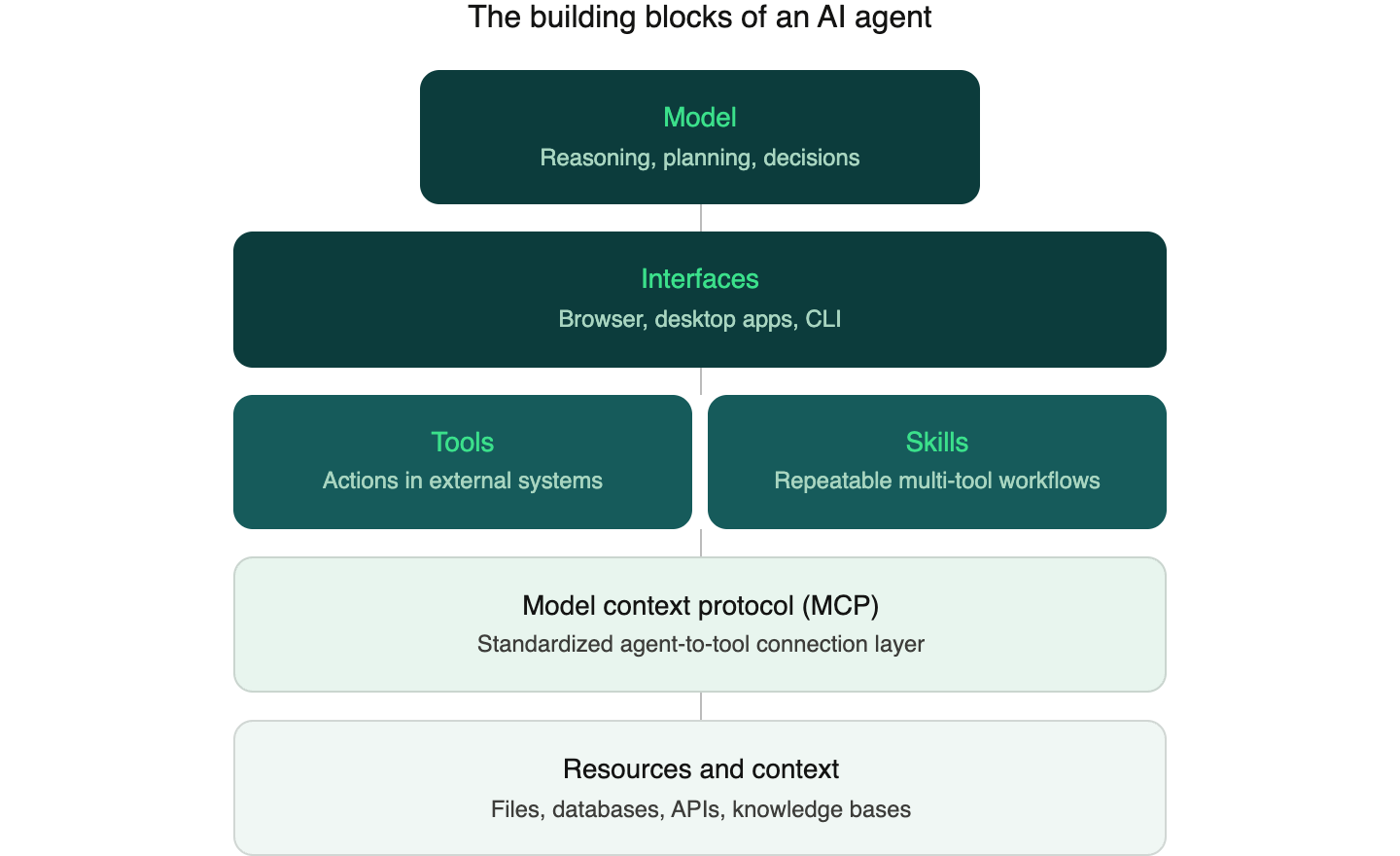
The Building Blocks: Models, Interfaces, Tools, Skills, and MCP
Understanding the components that make agents work is key to understanding how they can be governed.
Models are the large language models at the center of an agentic system. They handle reasoning, planning, and deciding what to do next. Models from Anthropic, OpenAI, Google, and others serve as the "brain" of an agent.
Interfaces are where humans interact with agents and where agents interact with the systems around them. These take three main forms today.
- Browser-based interfaces like ChatGPT, Claude, and Gemini give users access to agents through the web, with growing support for tool use, file handling, and connections to external services through MCP.
- Desktop applications like Claude Desktop and ChatGPT Desktop run natively on the machine and can access local files, applications, and system resources that browser-based tools cannot reach.
- Command-line agents like Claude Code, OpenAI's Codex CLI, and Google's Gemini CLI give developers an agent that runs directly in the terminal, with access to the local filesystem, the ability to execute shell commands, read and write code, run tests, manage git workflows, and interact with cloud infrastructure.
The interface matters for governance because it determines what the agent can access and what security tooling can observe. A browser-based agent operates in an environment where a browser extension can inspect every interaction. A desktop agent operates outside the browser, where traditional web security controls have no visibility. A CLI agent inherits whatever permissions the terminal session has. A developer running Claude Code in a repository with AWS credentials in the environment has given that agent implicit access to cloud resources. And because CLI agents communicate with model endpoints over HTTPS, their traffic looks like normal developer activity to most network monitoring tools. Each interface requires a different governance approach, which is why a single control point is never enough.
Tools are functions that an agent can call to take action in external systems. A tool might create a PowerPoint presentation, submit a pull request, update a CRM record, generate a report from a database query, or spin up a cloud environment. Tools are what give agents the ability to do things beyond generating text. When a model decides it needs to create a Jira ticket or push a code change, it invokes the appropriate tool.
Skills are higher-level packages that combine multiple tools, instructions, and domain knowledge to accomplish specific tasks in a repeatable way. Think of a skill as a recipe. A "quarterly reporting" skill might include instructions for pulling data from a BI tool, formatting it according to company templates, generating a summary narrative, and assembling the final document. Skills matter because they allow organizations to codify best practices into reusable components that any agent can execute consistently. They're also how agents get efficient at specialized tasks. Rather than figuring out each step from scratch every time, an agent with a well-designed skill can follow an established workflow, using the right tools in the right order with the right parameters. This is what transforms a general-purpose model into something that reliably handles a specific business process.
The Model Context Protocol (MCP) is rapidly becoming the standard for how agents connect to tools and data sources. Released by Anthropic in late 2024 and since adopted by OpenAI, Google, and hundreds of other companies, MCP provides a single, standardized protocol so that any AI application can connect to any MCP-compatible server. As of early 2026, the official MCP registry lists over 6,400 servers.
If you're familiar with APIs, MCP is best understood as an abstraction layer on top of them. Many MCP servers are wrappers around existing APIs, but instead of requiring a developer to write custom integration code for each endpoint, MCP wraps functionality into "tools" with natural language descriptions that a model can discover, reason about, and invoke on its own. For security, this is significant: agent-to-tool communication is increasingly flowing through a common, inspectable protocol layer rather than scattered across dozens of bespoke integrations.
Resources and context are the data that agents access to inform their reasoning. This includes files on a local filesystem, database records, documents in a knowledge base, and real-time data from APIs. Agents often need to pull in significant amounts of sensitive data as context to complete their tasks, which is where the governance challenge really begins.
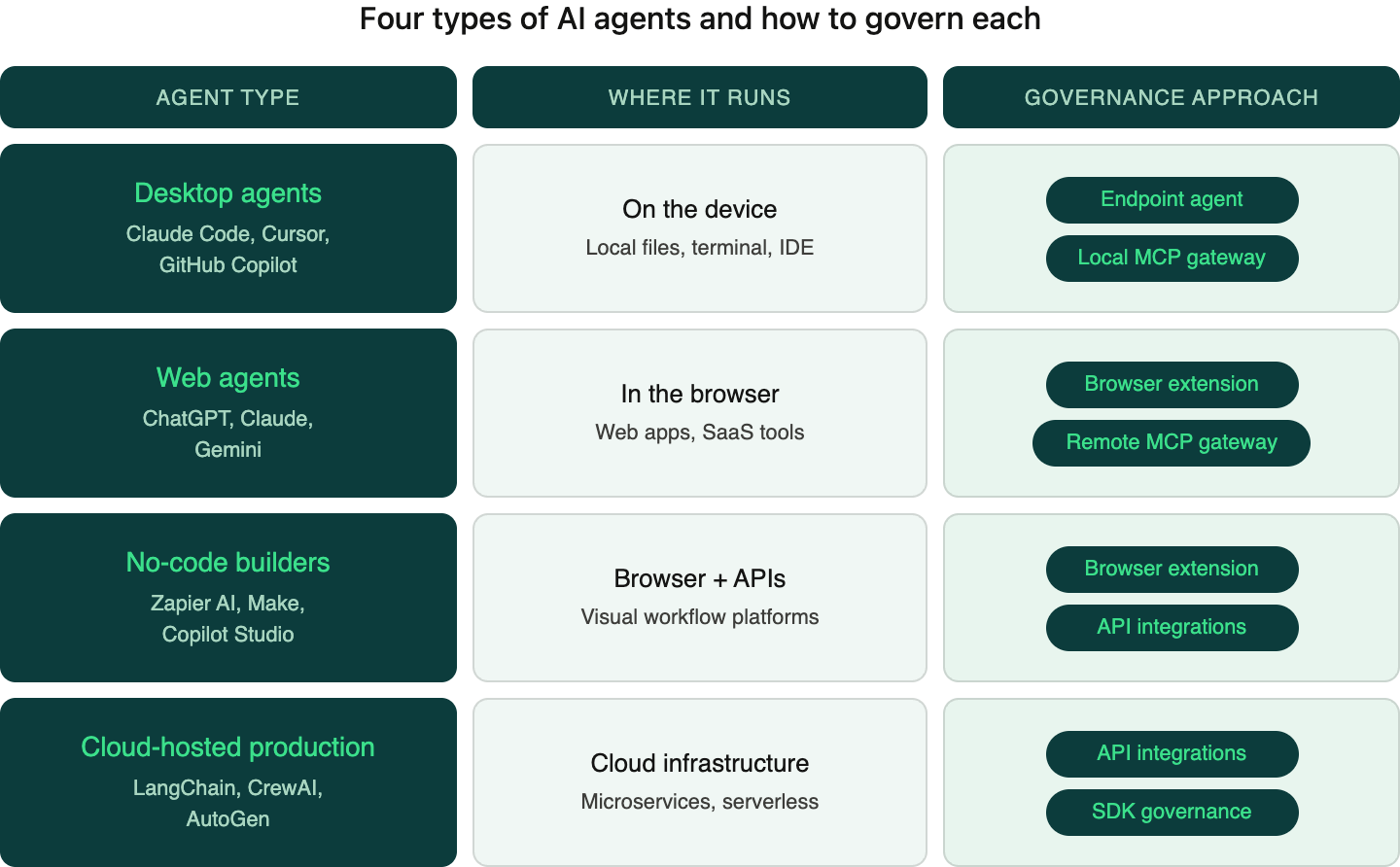
Four Types of AI Agents and How to Govern Each
Not all agents are the same. They differ in where they run, what they can access, who builds them, and how they interact with enterprise systems. These differences have direct implications for governance.
1. Desktop Agents
What they are: AI applications installed directly on a user's machine that can read local files, execute commands, and take actions on the device. Claude Desktop, ChatGPT Desktop, Cursor, Claude Code, OpenClaw and GitHub Copilot all fall into this category.
How they work: These agents run as native applications with varying degrees of access to the local filesystem, terminal, and other applications. A developer using Claude Code, for example, might give the agent access to an entire codebase, allowing it to read files, write code, run tests, and commit changes. A designer using Cursor might have the agent reading and modifying project files directly on disk.
What makes them distinct: Desktop agents operate outside the browser. They interact with local files and system resources that browser-based tools can't reach. This makes them extremely powerful for developers, designers, and other technical users, but also means they can access sensitive data that lives on the endpoint itself: local repositories, credentials files, SSH keys, configuration data, and internal documentation stored on the machine.
The governance challenge: Traditional browser-based security controls can't see what's happening inside a desktop application. A web proxy or browser extension has no visibility into what Claude Code is reading from the filesystem or what data Cursor is sending to its model endpoint.
How to govern them: Desktop agents require two complementary approaches. An endpoint agent installed on the device monitors AI application behavior at the operating system level, observing what files are being accessed, what data is being sent to external endpoints, and applying policy in real time. A local MCP gateway sits between the desktop agent and the MCP servers it connects to. Because desktop agents increasingly use MCP to reach tools and data sources, a gateway that intercepts and inspects MCP traffic provides a powerful control point. It can enforce policies on which tools an agent is allowed to use, what data it can access, and whether sensitive content should be blocked or redacted before it leaves the device.
2. Web Agents
What they are: Browser-based AI applications with tool access that extends beyond simple chat. ChatGPT, Claude, and Gemini all now support web browsing, code execution, file handling, and interaction with external services directly within the browser.
How they work: When a user asks Claude to search the web, analyze a spreadsheet, or interact with a connected service through an MCP integration, the model orchestrates a sequence of tool calls behind the scenes. A single instruction might trigger a dozen or more steps: searching multiple queries, reading several pages, processing data, and synthesizing an output.
What makes them distinct: Web agents live in the browser, which is both a constraint and an opportunity. They can't access the local filesystem, but they can connect to a growing ecosystem of web-based tools and services through MCP and other integrations. The browser is also where employees interact with enterprise SaaS applications, making it a natural convergence point for AI usage and data sharing.
The governance challenge: The volume and variety of data that can move through what looks like a simple conversation. An employee might paste an entire customer database into a prompt. They might connect their personal ChatGPT account to company tools through MCP. They might be sharing sensitive data with a free-tier AI service that the organization has zero visibility into.
How to govern them: A browser extension provides direct visibility into every AI interaction happening in the browser, inspecting prompts in real time, understanding the context and sensitivity of data being shared, and applying policies before data leaves the browser. A remote MCP gateway governs the connections between web-based AI tools and the MCP servers they connect to. As web agents increasingly rely on MCP to access external tools and data, a gateway in the network path can enforce policies on which servers an agent can reach and what data flows through those connections.
3. No-Code Agent Builders
What they are: Platforms that allow business users to create automated AI workflows connecting to enterprise systems without writing code. Notion Agents, Zapier AI, Make, and Copilot Studio are leading examples. These platforms let a marketing manager build an automated workflow that monitors incoming leads, enriches them with AI-generated summaries, and posts updates to Slack, without involving engineering at all.
How they work: These platforms provide visual interfaces where users define triggers, actions, and AI processing steps. Under the hood, the platform connects to enterprise applications through APIs and runs prompts through AI models at various stages of the workflow. The user defines what should happen; the platform handles execution.
What makes them distinct: No-code agent builders democratize AI automation. The people building these workflows are typically business users, not developers or people with deep security expertise. They're building workflows that connect AI to CRM systems, email platforms, project management tools, and databases, often with broad permissions granted during initial OAuth setup that they may not fully understand.
The governance challenge: The people building these workflows are rarely thinking about data security implications. A well-intentioned operations manager might build a workflow that pulls customer records from Salesforce, sends them to an AI model for summarization, and stores the results in a shared Notion page, inadvertently exposing sensitive customer data at multiple points in the pipeline. Permissions are often overly broad, and the data flows can be difficult to audit after the fact.
How to govern them: A browser extension monitors the usage of these platforms (since they're accessed through the browser), catching the human interaction layer: what the user is building, what data they're inputting, what configurations they're setting up. Direct API integrations provide visibility into the automated data flows happening behind the scenes once workflows are running, monitoring what data is being pulled from connected systems and what's being sent to AI models for processing.
4. Cloud-Hosted Production Agents
What they are: Autonomous AI systems deployed as services, typically built by engineering teams using frameworks like LangChain, CrewAI, and AutoGen. These agents orchestrate multi-step tasks across APIs and data sources, running continuously in cloud infrastructure without direct human interaction for each execution.
How they work: These are programmatically defined agents running in production environments. An engineering team might build an agent that continuously monitors support tickets, classifies them, drafts responses, routes them to the right team, and escalates critical issues. Another might process incoming documents, extract key information, validate it against internal records, and update databases automatically. These agents are deployed as microservices or serverless functions, triggered by events, schedules, or API calls.
What makes them distinct: Cloud-hosted production agents are the most autonomous category. They run without a human in the loop for most executions. They typically have broad API access to internal systems, and they process high volumes of data continuously. A misconfiguration or prompt injection vulnerability can affect thousands of transactions before anyone notices.
The governance challenge: These agents are invisible to browser extensions and endpoint agents because they run entirely in cloud infrastructure. They interact with data through APIs, and the flows can be complex, spanning multiple services, databases, and external APIs in a single workflow. Engineering teams building them often prioritize functionality and performance, with data governance treated as a later concern.
How to govern them: Cloud-hosted production agents are governed through API integrations that sit in the data flow between the agent and the systems it interacts with. This means integrating governance directly into the API layer: monitoring the data that agents read from and write to internal systems, inspecting the prompts and contexts being sent to AI models, and enforcing policies on what sensitive data can be included in agent workflows. Because engineering teams build these agents, governance can also be embedded into the development process through SDK integrations and pre-deployment policy checks.
The Full Picture
Each of these four agent types runs in a different environment, uses different integration patterns, involves different users, and requires a different governance approach. Browser extensions alone won't catch desktop agent usage. Endpoint agents alone won't see cloud-hosted production workflows. API integrations alone won't govern the prompts employees type into ChatGPT. Effective coverage requires multiple control points working together: endpoint agents and local MCP gateways for desktop agents, browser extensions and remote MCP gateways for web agents, browser extensions and API integrations for no-code builders, and API integrations for cloud-hosted production agents.
The potential of agentic AI is enormous. Developers are shipping code faster with desktop agents. Operations teams are automating multi-step workflows that used to eat entire afternoons. Business users are building sophisticated AI-powered processes without writing a single line of code. And engineering teams are deploying autonomous agents that handle high-volume tasks around the clock. These productivity gains are real, and they compound over time.
Governance plays a key role in unlocking that potential. When employees trust that guardrails are intelligent and transparent, they adopt AI tools more freely and more visibly. When security teams have coverage across every surface where agents operate, saying "yes" to new tools becomes a lot easier than defaulting to "no." The best version of this looks like agents working everywhere they can add value, with governance keeping pace at every step.
Harmonic Security provides visibility and control across the agentic landscape. For further exploration, check out our securing Claude Cowork guide and our free, open-source Claude auditing tool.
.png)
.png)
