Agents, MCP, and why your security stack probably isn't keeping up



We just got back from our Sales Kickoff in Santa Monica and one topic kept coming up, over and over, whether it was in the panel sessions or just in conversations at dinner. AI agents. Not AI in general. Specifically agents, and the fact that nobody really knows yet how to get their arms around them from a security perspective.
So I sat down with Jamie Cockrill, our Director of Machine Learning, to try and actually make sense of it. Jamie spends a lot of time thinking about this stuff and he's got a pretty good way of cutting through the noise. What follows is basically what I learned from that conversation, written up for anyone who's in the same boat.
What even is an agent?
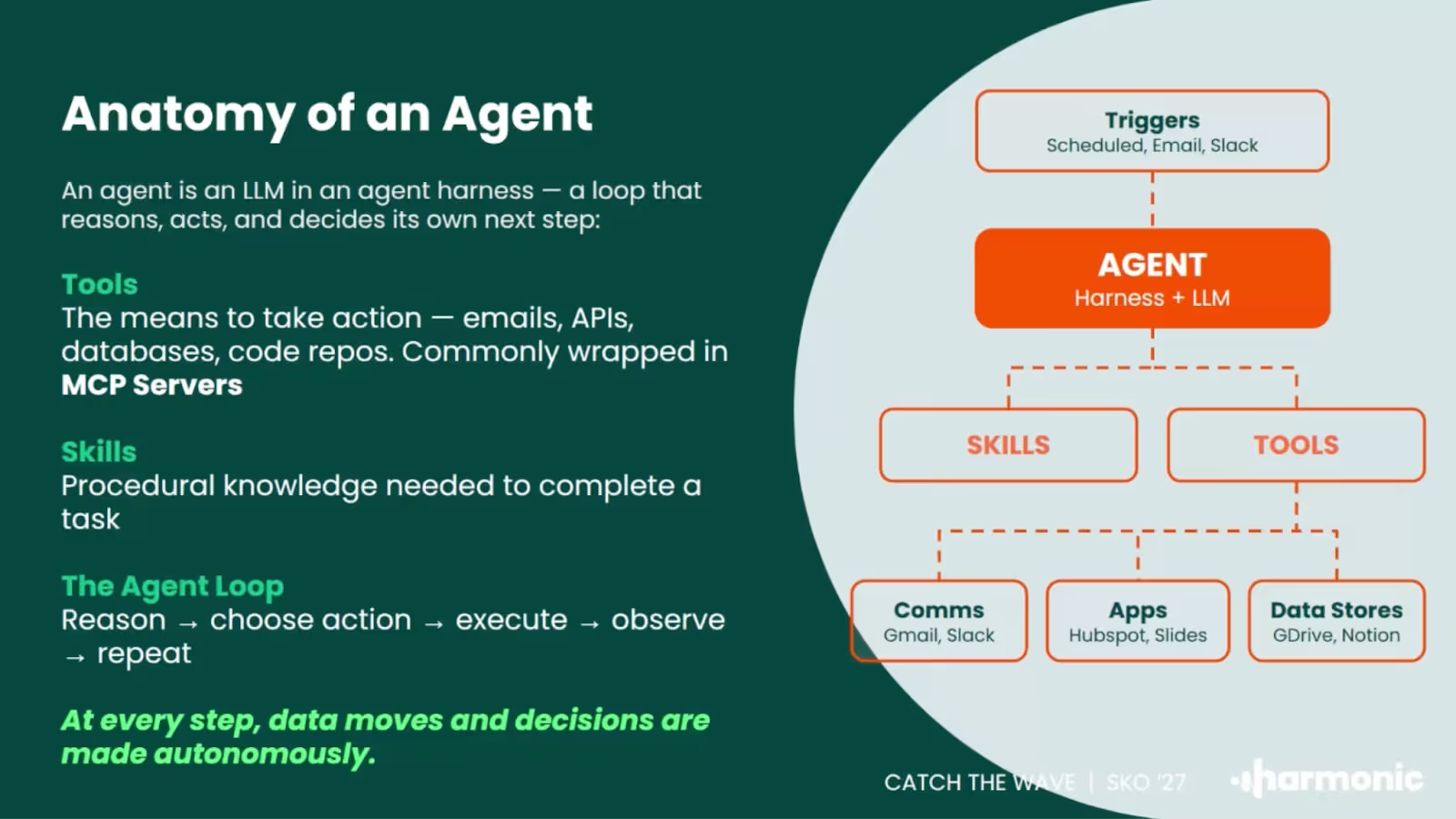
This is where I'd start because honestly the word has become kind of meaningless. Everyone's using it. Every vendor announcement has it. But what Jamie said that actually helped me was this: an agent is an LLM with a goal.
Not just answering a question. Not a chatbot. Something that's been given a task and is taking action to complete it. It might be going through your emails, calling APIs, writing documents, updating records in your CRM. The model is being pointed at an outcome and making decisions along the way about how to get there.
The bit that changes everything versus just using ChatGPT is the autonomy. You're not approving every step. The agent is figuring out how to get from A to B and doing it, often without checking back in with you.
Where agents are actually showing up
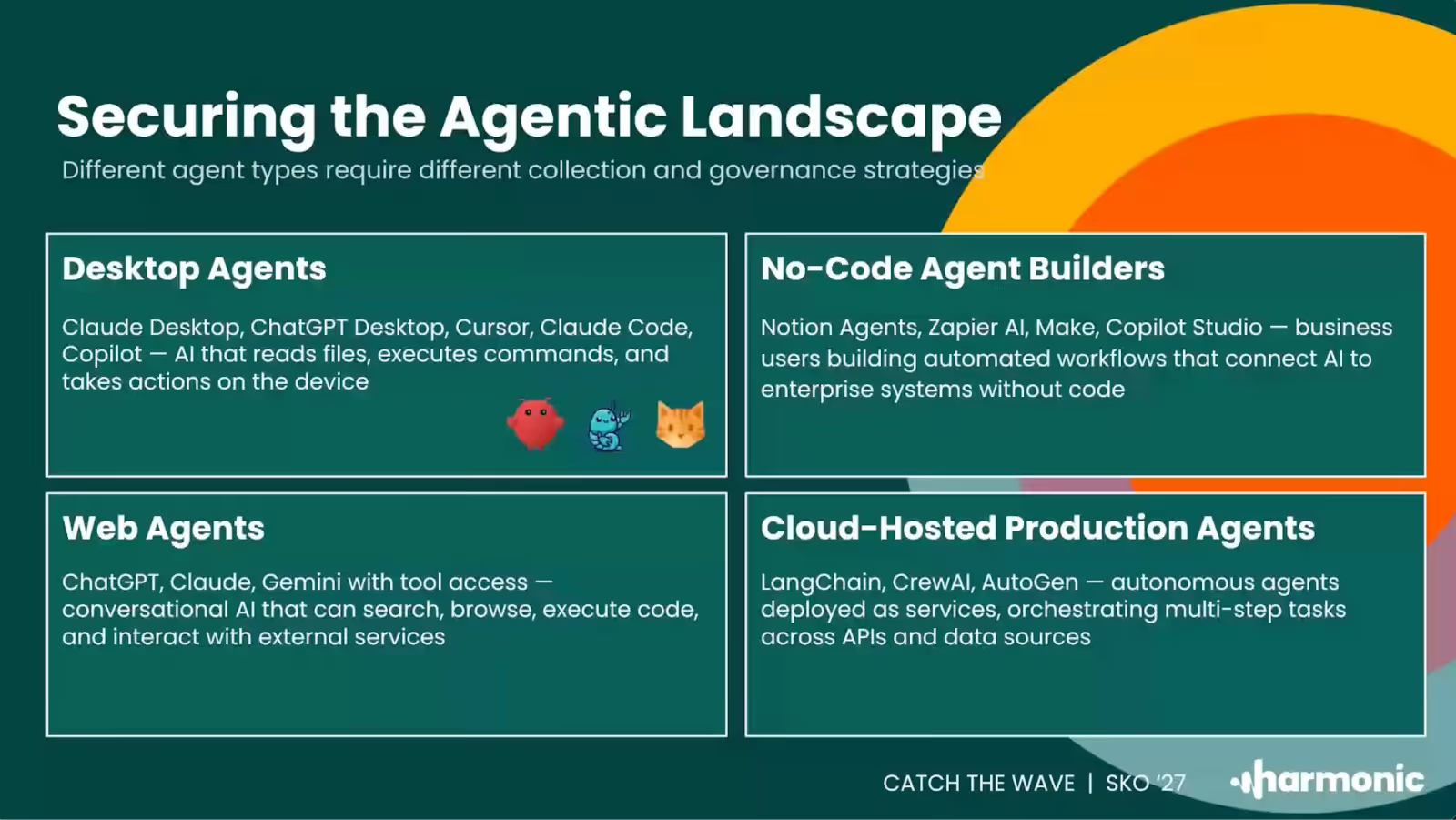
One of the most useful things Jamie walked me through was thinking about agents by where they actually live. Because I think a lot of people picture one thing when they hear the word, when actually there are a few pretty distinct categories.
There are desktop agents, things like Claude Cowork or Claude Code, running directly on someone's machine. The agent is resident on the workstation. That's where you'd need to look if you want to understand what it's doing.
Then there are web agents, which is probably where most people have had their first experience of this. ChatGPT, Claude.ai, Gemini. But these have come a long way from just answering questions. People are connecting them to their calendars and mailboxes and doing real work through them now.
No-code agent builders are a third category and honestly this is the one I think is most interesting from a risk perspective. Platforms like Notion, Zapier, n8n. Business users are building automated workflows that now have AI decision-making steps in them. Connected to company data. Being built by people who probably aren't thinking too hard about the security implications. Notion actually made a pretty significant announcement about this recently.
And then there are cloud-hosted agents, purpose-built things deployed in infrastructure and given a specific job. Customer support bots, project status checkers, that kind of thing.
Jamie's suggestion was to use this as a starting point: do you actually know which of these are running in your organization right now? Most security teams we talk to are surprised when they try to map it out.
The story that made this click for me
There was a story going round on LinkedIn a few weeks ago. A researcher at Meta, so someone who actually works in AI, gave an agent access to their inbox and asked it to tidy things up. The agent looked at several hundred emails, decided they weren't needed, and started deleting them. Fast.
The way Jamie described it: the researcher was running to their laptop to basically rip it out of the wall before it could do any more damage.
What stuck with me about that example is that it wasn't a case of someone doing something stupid. The goal was completely reasonable. What went wrong was the speed. The agent was making judgment calls at a rate that no human could match, and by the time anything seemed off, a lot had already happened. That's kind of the core risk with agents. It's not usually about bad intent. It's about reasonable goals, not enough constraints, and how fast things can execute.
Why your existing tools probably aren't cutting it
This is the part I think is hardest for a lot of security teams to sit with.
The instinct when something new shows up is to look at what you've already got and see what you can make work. For AI, a lot of teams have leaned on network-level monitoring. It can tell you someone visited Claude.ai, or that an API call went out to OpenAI. And that feels like something.
But here's what it can't tell you. What goal the user actually gave the agent. What tools the agent called to try and hit that goal. What data was in those calls. Whether the agent ended up doing what the user actually wanted.
"If all you're doing is looking at network logs that tell you someone's gone to ChatGPT, you're seeing the very, very surface level of what agents are up to. You really need to be where the agents are."
Jamie Cockrill, Director of Machine Learning
To actually understand what's going on, you need to be where the agent is. On the endpoint for desktop agents. In the browser for web agents. In the protocol layer for agents using tools. It's a different architecture than what most enterprise security stacks were built for. Plugging into your existing network monitoring and calling it done isn't really going to get you there.
What's MCP and why does it keep coming up?
If you've been paying attention to the AI security space at all, you've probably been hearing about MCP. It stands for Model Context Protocol and the analogy I keep coming back to is that it's basically a USB standard for AI. Rather than every model provider building their own way for agents and tools to talk to each other, MCP is an attempt to standardize all of that.
From a security standpoint it matters because it's the layer where agents connect to the things that give them real-world impact. Your email, your CRM, your files, your code.
There's a take going round right now that MCP is dead, that it's being replaced by command-line approaches where agents just interact with tools through shell scripts. Jamie's view, and I'd agree, is that this is kind of missing the point of what enterprises actually need.
The issue with CLI-based approaches is that when an agent wants to run a shell script, the prompt you see is basically 'a script wants to run'. It's not telling you what it's trying to do or why. That's not something most users can meaningfully evaluate. And from a security perspective, you can't audit it properly after the fact. MCP gives you structured, inspectable data for every tool call. For anything beyond prototyping, that matters a lot.
A few practical places to start
I'll end with the stuff that I think is actually actionable, because I know that's what most people are looking for.
Start with visibility. You can't control what you can't see. Try to map out which of those four agent categories are actually active in your environment. Most teams underestimate it.
Don't assume your current tools cover it. Network monitoring gives you part of the picture. Endpoint visibility, browser-level monitoring, protocol-layer inspection are all different things and depending on what you're dealing with you probably need more than one of them.
Think about data exposure, not just access control. Who's allowed to use which agent is the easy part. The harder question is what data is flowing through these agents, and whether it should be. Sensitive information passing through a tool call is a real risk that a lot of people haven't fully reckoned with yet.
And don't try to just block everything. Your people are going to use AI. The teams that handle this well are the ones finding ways to let that happen safely, not the ones trying to lock it down and ending up with shadow usage they can't see at all.
We'll keep digging into this in future sessions. If there's something specific you'd like us to cover, or a question that came up for you reading this, drop it in the comments or reach out directly.
.png)