
The Hidden Cost of "Free" AI Writing Tools: Analyzing Usage of Grammarly and QuillBot in the Enterprise



Whether you like it or not, employees across your organization are typing sensitive information into AI writing assistants like Grammarly, QuillBot, and Wordtune. They're polishing customer contracts, refining strategic memos, and improving financial reports. What they don't realize is that with every keystroke, they're potentially feeding confidential data into training pipelines that exist far beyond your security perimeter.
This isn't theoretical. Recent enterprise intelligence data reveals that Grammarly alone accounts for 79% of all sensitive data exposure among writing tools, with 2,596 sensitive data incidents captured in a single analysis period. With 44,914 total prompts and a 5.8% exposure rate, Grammarly ranks #1 among shadow AI writing tools for data leakage risk.
It also demonstrates perfectly some of the biggest Shadow AI challenges:
- It doesn’t fit neatly into an “AI Category” you can easily block
- There’s a tonne of niche tools cropping up all the time
- Many train on your data
The Shadow AI Problem Hiding in Plain Sight
Shadow AI—the unauthorized use of AI tools without IT approval—has exploded across enterprises. According to our own 2025 research, 21.81% of sensitive data went into tools that train on user inputs - this includes free versions of ChatGPT, Gemini, Claude and Meta AI.
But Shadow AI goes beyond these core AI apps; there is a longer tail of AI-powered tools in use in the enterprise. AI-powered writing tools are a great example of this long tail.
The Data Training Problem: Your Content Becomes Their Product
The fundamental issue with free AI writing tools isn't just that they process your data…they’re often training on it.
Grammarly's Training Default
Despite its enterprise-grade security certifications, Grammarly's free, premium, and single-user Pro accounts have a critical setting enabled by default: Product Improvement and Training. According to Grammarly's own documentation, this means:
- Your content is used to train and validate AI models
- Text is sampled to inform feature development
- Data is processed to improve suggestions for all users
While users can opt out through account settings, the vast majority never do. Enterprise and team accounts purchased through Grammarly's sales team have this disabled by default, but individual accounts—the ones employees use with their personal emails—do not.
QuillBot's October 2025 Policy Shift
QuillBot recently updated its privacy policy with a significant change: they now store text inputs from all desktop users by default. Previously, input processing occurred solely in real-time without storage.
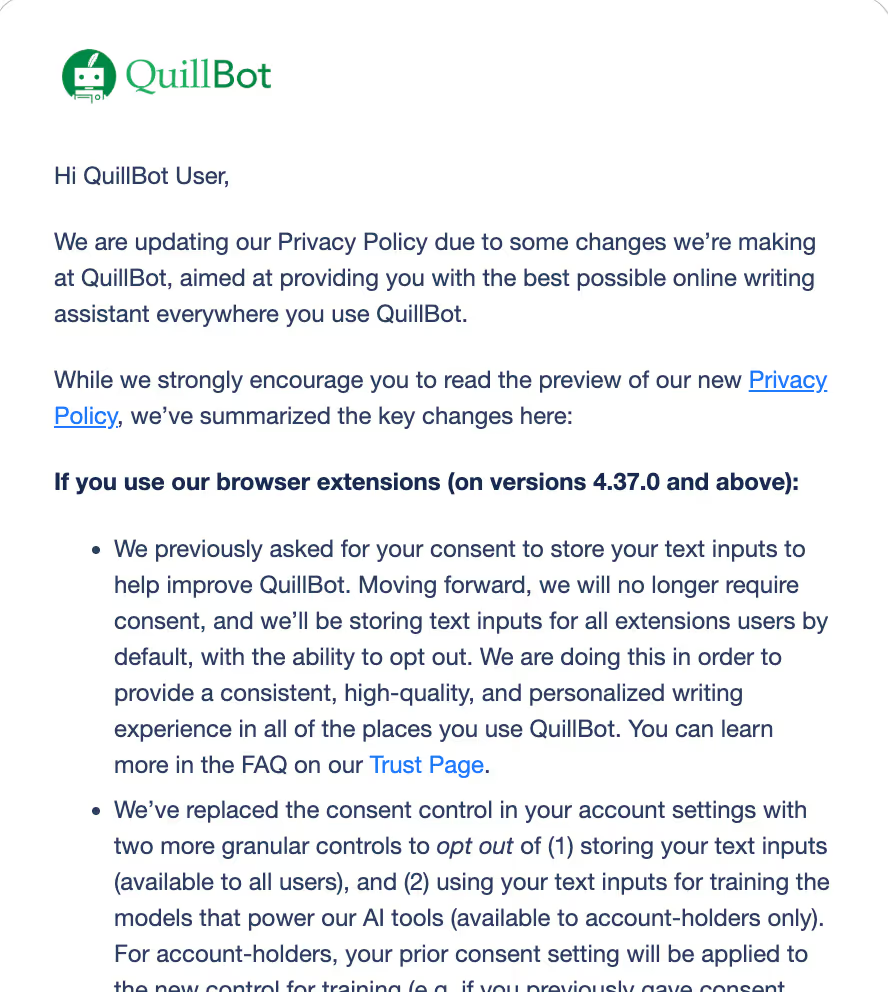
The new policy introduces two opt-out controls:
- Storing your text inputs (available to all users, but enabled by default)
- Using your text inputs to train AI models (available only to account holders, also enabled by default)
QuillBot explicitly states: "When storage is on, QuillBot can provide a more consistent, high-quality, and personalized experience." Translation: your data stays in their systems to improve their algorithms.
Notably, Team Plan users are excluded from training by default, but individual accounts (again, the ones your employees are using) are not.
By the Numbers: The Scale of Writing Tool Data Exposure
So what is the extent of the problem? What type of sensitive data even goes into these tools? We sliced and diced our AI Usage Index to dive deeper into these trends and discovered a surprisingly high number of exposures across different use cases.
There are 18 AI-powered writing tools that saw sensitive data uploaded into them as part of this research, but Grammarly dominates the usage. Other tools include Quillbot, Wordtune, Rytr, ContentBot, and Sudowrite.
Understanding usage patterns
The solution clearly isn't to ban AI writing tools. Rather, teams need to understand why employees are using them and what problems they're solving. When you discover widespread Grammarly or QuillBot adoption, start by tracking use cases: Are employees polishing customer emails? Drafting marketing copy? Improving technical documentation?
Once you understand the "why," you can make informed decisions about providing enterprise versions with proper data controls or configuring existing solutions to meet those needs.
The key is targeted governance based on actual risk. Your marketing team writing blog posts faces different exposure than legal drafting settlements or finance preparing investor memos. Implement department-specific guardrails that allow appropriate AI assistance while protecting sensitive data types: PHI for healthcare, PII for customer service, financial data for accounting, legal content for counsel.
How Harmonic Helps
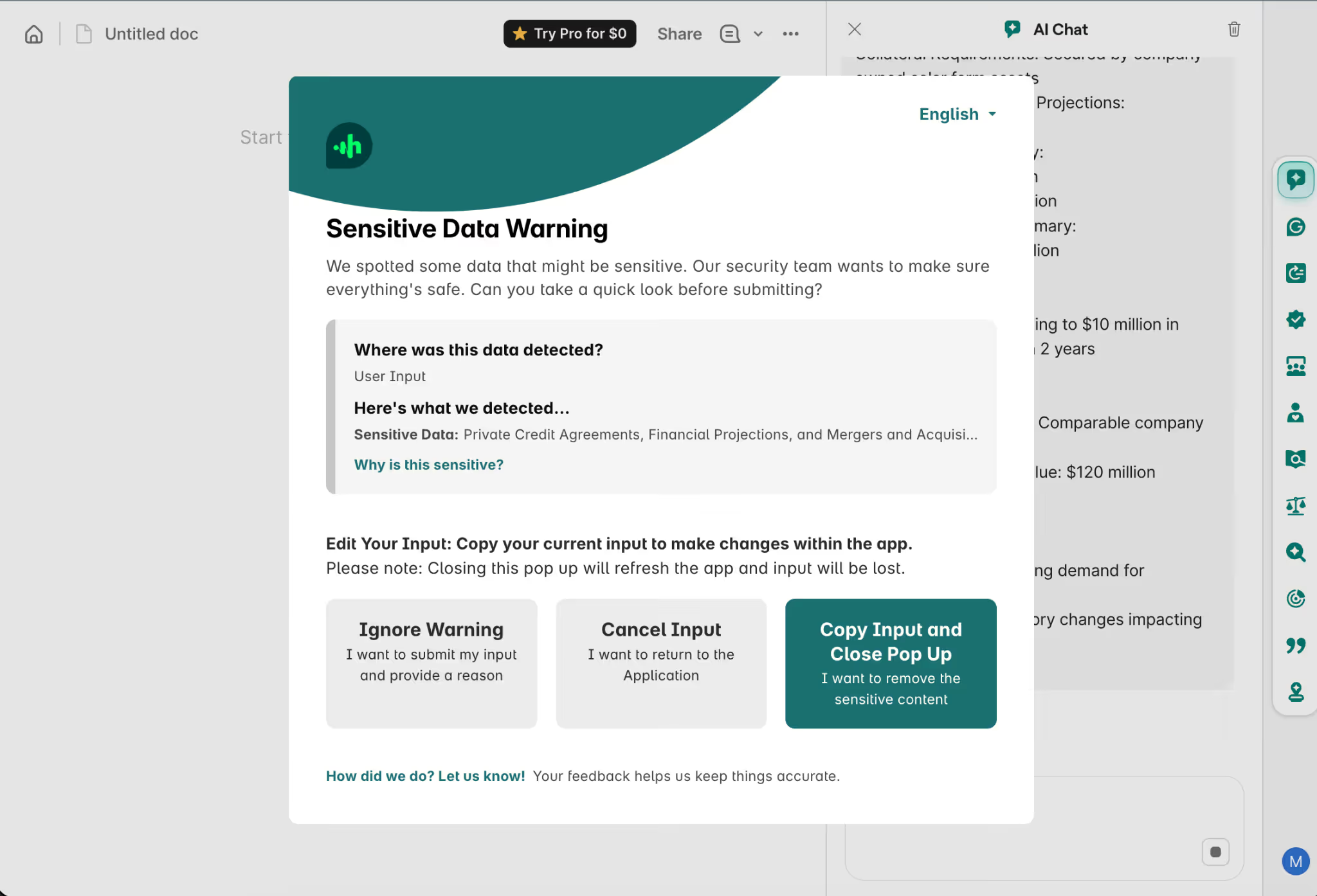
Harmonic provides the visibility and control needed to govern AI writing tools without blocking productivity. Our platform discovers shadow AI usage across your organization, showing exactly which tools employees are using, what data they're exposing, and why.
With endpoint-native controls, Harmonic analyzes content semantically as it's typed—identifying sensitive data types in real-time before transmission to AI services. This enables contextual policies: marketing can use writing assistants freely while legal and finance get automatic redaction of regulated content.
Instead of organization-wide blocking, you get surgical governance: understand usage patterns, provide approved alternatives where justified, and implement smart guardrails that protect what matters.
The Bottom Line
AI writing tools like Grammarly and QuillBot aren't going away. With 79% of writing tool data exposure coming from Grammarly alone, and employees using these tools to solve real productivity problems, you need a strategy that balances enablement with protection.
The path forward starts with visibility into what tools are being used and why, continues with providing approved enterprise alternatives where justified, and ends with smart guardrails that protect sensitive data types for high-risk departments while allowing appropriate use elsewhere. The question isn't whether your employees are using these tools. Instead, it's whether you understand what they're exposing and have the right controls in place.
.png)
.png)
