
What 22 Million Enterprise AI Prompts Reveal About Shadow AI in 2025



Research based on the AI Usage Index dataset analyzing 22,458,240 enterprise GenAI prompts from January 1 - December 31, 2025
While only 40% of companies have purchased official AI subscriptions, employees at over 90% of organizations actively use AI tools. This is mostly through personal accounts that IT never approved. Our analysis of 22.5 million real enterprise prompts quantifies exactly what this shadow AI problem looks like and, more importantly, what intelligent governance looks like in practice.
Six key findings from the data:
- Data exposure risk is heavily concentrated, but you can't just block the rest: Six applications account for 92.6% of sensitive data exposure. But with traffic and data exposure to 665 AI tools in our dataset, blocking the remaining applications would be futile and counterproductive.
- Application and Data Context matters. Risk isn't determined by the application name alone; it's about the combination of what's being used and how. Approved legal data in Harvey could be fine, but customer data in ChatGPT Free wouldn't be.
- Free, Personal accounts create a massive blind spot: 98,034 sensitive instances (16.9% of all exposures) flow through personal free-tier accounts where IT has zero visibility, no audit trails, and data may train public models.
- High-usage productivity tools aren't your biggest problem: Translation tools see 4.1M prompts (18% of usage) and design tools 2.1M prompts (9% of usage), but combined they represent only 2% of total risk. Blocking these would destroy productivity for minimal security gain.
- China-based tools require nuanced policies: 925,519 prompts (4% of usage) went to China-headquartered tools, with DeepSeek showing particularly high code exposure. However, Kimi Moonshoot saw the most traffic overall. Jurisdictional risk matters, but blanket blocking breaks workflows for Asia-Pacific teams.
- Sensitive-data exposure is concentrated in a small number of categories. Code, legal discourse, M&A data, financial projections, and investment portfolio data accounted for 74.6% of the sensitive-data instances Harmonic Security detected in 2025.
The Reality of Shadow AI in The Enterprise
The MIT Research: Why Employees Bypass Official Tools
MIT's Project NANDA studied over 300 publicly disclosed AI initiatives and found a stark disconnect:
- 40% of companies have purchased official LLM subscriptions
- 90%+ of employees regularly use personal AI tools for work
- 95% of organizations report zero P&L impact from formal AI investments
- Meanwhile, "shadow AI often delivers better ROI than formal initiatives"
Employees adopt shadow AI for immediate access to better tools that save them 40-60 minutes daily, bypassing procurement delays and IT tickets entirely. These applications deliver superior user experiences designed for individuals, not enterprise bureaucracy.
The Gartner research validates this acceleration: shadow IT will reach 75% of employees by 2027, up from 41% in 2022. When AI users bring their own tools regardless of policy, blocking becomes futile.
What 22.5 Million Prompts Tell Us
This research draws on anonymized enterprise data collected through Harmonic Protect, which tracks GenAI browser usage across organizations in the United States and the United Kingdom.
- Time Period: January 1 - December 31, 2025
- Total Prompts Analyzed: 22,458,240 prompts and file uploads
- Applications Tracked: 665 generative and AI-embedded tools
- Sensitive Data Instances: 579,113 detected exposures
- Organizations: Multiple enterprises across US and UK markets
The data reflects real-world employee activity within security-conscious enterprises using Harmonic's monitoring solutions. No personally identifiable information or proprietary file contents left customer environments. All data was aggregated and sanitized before analysis.
Which AI Tools Employees Actually Use (And Why It Matters)
Six Applications Account for 92.6% of Sensitive Data Exposure
One of the most actionable findings: while employees use 600+ different AI tools, risk concentrates heavily.
What this means for governance: You don't need to solve 300 problems. Understanding and applying appropriate guardrails to these 6 applications addresses the overwhelming majority of exposure.
Of course, "guardrails" doesn't mean "blocking". Rather, it means visibility, context-aware policies, and targeted interventions.
Beyond the Top 10: The 665 Tool Challenge
Beyond the top 10, our dataset tracks 655 additional AI applications. New tools appear constantly:
- Specialized coding assistants (Cursor, Lovable, Bolt)
- Domain-specific AI (Harvey for legal, Jasper for marketing)
- Emerging models (DeepSeek, Kimi Moonshot, newer entrants)
- AI features embedded in existing tools (Notion AI, Slack AI)
The shadow AI temptation is real. Every new "shiny tool" promises better results, faster performance, or novel capabilities. Employees experiment. Teams adopt tools that solve immediate problems. By the time IT learns about a tool, dozens of people may already rely on it for critical workflows.
Traditional blocking fails because block lists become unmanageable (our dataset alone tracked 665 tools), broad restrictions break legitimate productivity, and employees simply find workarounds through personal devices, VPNs, or tomorrow's new tool. You cannot block your way to AI safety. You need visibility into what's actually being used, understanding of why employees choose certain tools, and intelligent guardrails that protect sensitive data without destroying the productivity gains that make AI valuable.
What types of sensitive data do employees share with generative AI tools?
Five data types account for 74.6% of detected exposure
Harmonic Security’s analysis of 22,458,240 enterprise GenAI prompts and file uploads found that employees most commonly shared code, legal discourse, M&A data, financial projections, and investment portfolio data. Together, these five data types accounted for 432,043 of the 579,113 sensitive-data instances detected during 2025, or 74.6%.
- Code: 153,539 instances, or 26.5%
- Legal discourse: 128,918 instances, or 22.3%
- M&A data: 72,723 instances, or 12.6%
- Financial projections: 45,080 instances, or 7.8%
- Investment portfolio data: 31,783 instances, or 5.5%
A practical employee AI threat model can help teams evaluate these variables consistently across tools and workflows.
Three broader groups account for 85.3% of detected exposure
Grouping related data types shows where security teams face the greatest concentration of risk. Code and proprietary source code, business and legal content, and strategic financial data accounted for 494,064 sensitive-data instances, or 85.3% of the total.
Code and proprietary source code
Code and proprietary source code accounted for 175,406 instances, or 30.3% of all detected exposure. Developers often use AI to explain code, troubleshoot errors, and generate new functions. A short snippet may be routine, while another could reveal proprietary algorithms or internal architecture.
Credentials appeared less frequently, with 5,903 detected instances, but their consequences can be immediate. A single exposed API key or token may provide access to systems and data beyond the original AI conversation.
Business and legal content
Legal discourse, M&A data, and settlement content accounted for 222,806 instances, or 38.5% of the total. This was the largest of the three broader groups.
Legal teams use AI for contract analysis, drafting, and research. The same workflows can expose confidential client information, deal terms, litigation strategy, and material covered by an NDA. Controls need to distinguish public legal research from confidential matter data.
Strategic financial data
Financial projections, investment portfolio data, and sales pipeline information accounted for 95,852 instances, or 16.6% of the total. Finance teams use AI for modeling, forecasting, and analysis, sometimes with information that reveals future performance or company strategy.
Individual prompts may appear limited in isolation. Several related prompts can collectively reveal revenue expectations, investment decisions, sales performance, or other strategic information.
Different data types need different controls
Code and technical IP: Give developers approved coding assistants, detect credentials and secrets in real time, and intervene when prompts contain substantial proprietary code or sensitive architecture.
Legal content: Allow appropriate research while applying stronger controls to contracts, client matters, privileged communications, settlement terms, and litigation strategy.
M&A data: Give deal teams approved tools with controls suited to active transactions. Broad restrictions are likely to push urgent work into personal accounts or unmanaged tools.
Financial data: Detect unreleased forecasts, investment information, sales pipeline data, and material non-public information. Organizations may need additional controls during earnings periods, transactions, or other sensitive reporting windows.
Start with visibility into the work employees are trying to complete. Then apply controls based on the data, application, account type, and user intent.
Understanding AI Tool Categories and Usage Patterns
The 7 Categories: Different Tools, Different Purposes
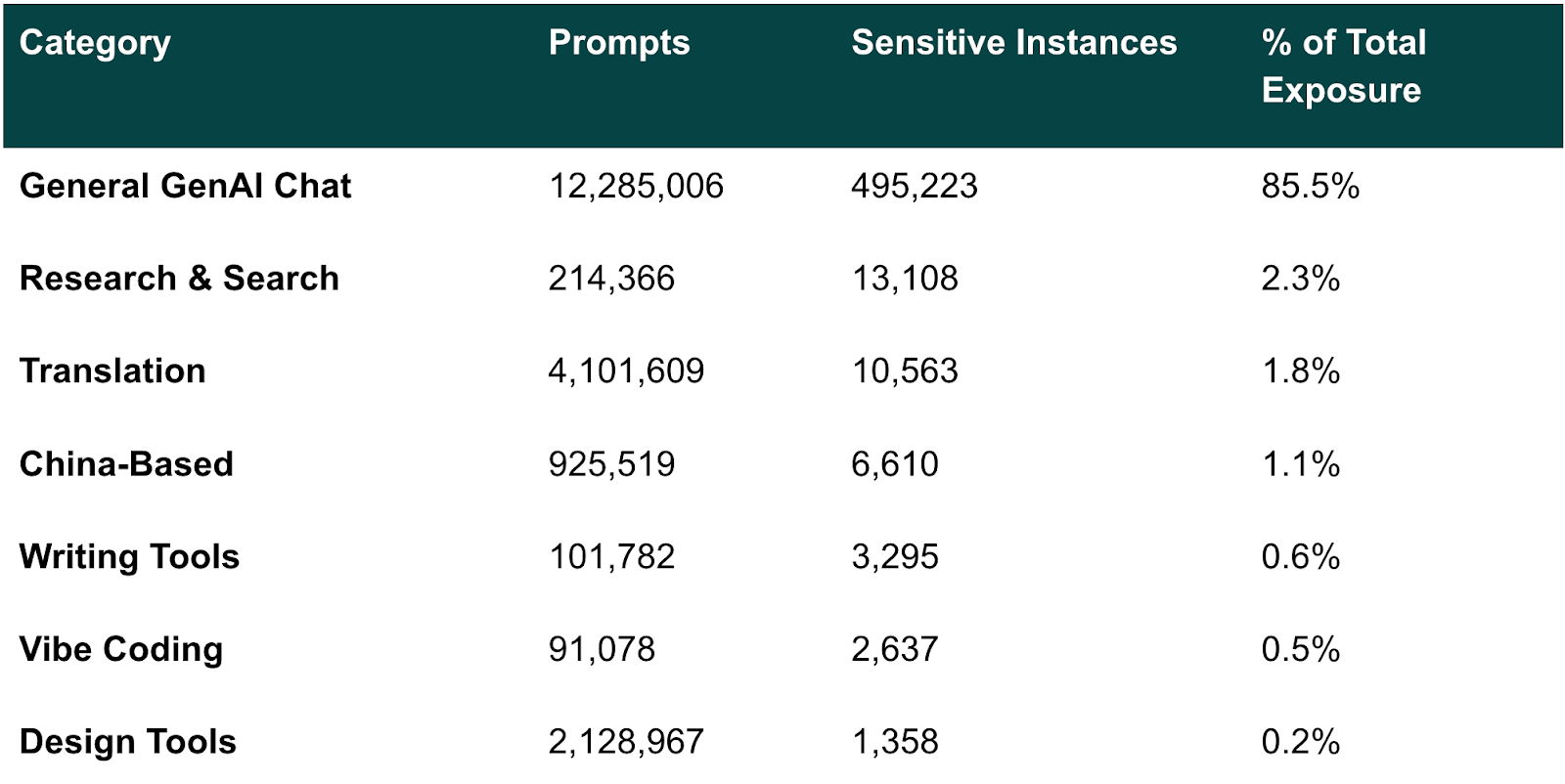
General Chat Tools: Where 85% of Risk Lives
ChatGPT, Gemini, Claude, Microsoft Copilot, and Grok represent 85.5% of total sensitive data exposure and the vast majority of AI productivity gains.
Block these tools and you eliminate 71% of enterprise AI value while pushing users to dozens of shadow alternatives. The security answer isn't blocking. Rather, it's intelligent enablement with real-time controls on the 85.5% that matters.
Coding Tools: Small Volume, High Credential Exposure
GitHub Copilot, Cursor, and 27 other coding assistants generate 89K prompts (0.4% of usage) with 2,637 sensitive instances—representing 0.5% of total risk.
The concentration risk: 12.8% of coding tool exposures are access keys (API tokens, credentials, secrets). Coding tools account for 5.7% of all access key exposures despite only 0.4% of usage (a 14× concentration).
Block coding assistants and engineering velocity collapses. Developers move to personal accounts with zero visibility. Better: provide enterprise tools, detect credentials in real-time, focus on the 12.8% that matter.
Translation Tools: High Usage, Legal Content Concerns
DeepL, Google Translate, Reverso, Linguee, and Papago drive the second-highest usage of any category but minimal overall risk.
- 4.1M prompts (18.3% of total AI usage)
- 10,541 sensitive instances (0.3% of translation tool prompts contain sensitive data)
The real story is what gets translated: 33% legal discourse, 21% M&A data, 14% sales pipeline content, 11% settlement documents. International teams aren't translating casual emails; they're translating contracts, deal documents, and financial materials.
At 1.8% of total risk despite massive usage, translation tools follow the design tool pattern: blocking destroys global productivity for negligible security gain. Worse, employees will simply shift to ChatGPT with "translate this contract" prompts—pushing translation into your highest-risk category.
China-Based AI Tools: Understanding Jurisdictional Risk
Tools like Kimi Moonshot, DeepSeek, Baidu Chat, ERNIE Bot, and 18 others see moderate usage driven by free access, speed, and multilingual capabilities.
- 925,519 prompts (4.1% of total AI usage)
- 6,610 sensitive instances (0.7% of China-based tool prompts contain sensitive data)
At 1.1% of total risk, the exposure is low but the nature of the risk is different. Data flowing to China-jurisdictional platforms creates regulatory compliance exposure, data sovereignty challenges, IP protection concerns, and potential contractual violations. Unlike design or writing tools where blocking destroys value for minimal gain, China-based tools warrant explicit policies due to jurisdictional considerations—not usage volume.
Design Tools
Design tools like Canva, Gamma, Midjourney, and Figma see massive adoption across enterprises, but sensitive data exposure is remarkably rare. When it does occur, the data shared tends to be genuinely sensitive, but the volume is minimal compared to usage.
- 2.1M prompts (9.5% of total AI usage)
- Only 1,358 sensitive instances (0.06% of design tool prompts contain sensitive data)
With design tools representing just 0.2% of overall risk despite accounting for nearly 10% of AI usage, blocking them would devastate creative workflows for virtually no security benefit.
Writing Tools
Writing assistants like Grammarly, QuillBot, and LanguageTool see moderate adoption but minimal risk exposure.
- 101,782 prompts (0.5% of total AI usage)
- 3,295 sensitive instances (3.2% of writing tool prompts contain sensitive data)
Even at 0.6% of total risk, writing tools are borderline concerns. The productivity value of error-free communication far exceeds the minimal exposure—and targeted policies can mitigate risk without wholesale blocking.
The Personal Account Problem: 17% of Exposure, Zero Visibility
98,034 Sensitive Instances on Free/Personal Plans
Our dataset tracks plan types for 5 major LLM providers: ChatGPT, Google Gemini, Microsoft Copilot, Perplexity, and Claude.
16.9% of all sensitive exposures happen through personal accounts—where IT has no visibility, admins can't enforce policies, data may train public models, no audit trail exists, and users can delete conversations before anyone notices.
Why employees use personal accounts
Sometimes the company hasn't purchased licenses yet, or procurement is still evaluating options. Other times, enterprise tools have frustrating limitations; lower rate limits, missing features, or slower performance. Many employees simply use what they're already familiar with from home, especially on personal devices that auto-login to personal accounts. And surprisingly often, employees don't even know an enterprise option exists because no one told them or they don't know how to request access.
Why blocking backfires
Block personal accounts without providing alternatives, and employees immediately find workarounds: personal devices, home networks, mobile hotspots. Can't use ChatGPT Free? They'll try Claude, Gemini, Perplexity, or Grok. Productivity collapses, frustration rises, and (worst of all) you lose visibility into what tools they're actually using.
A smarter approach
Start by understanding who's using personal accounts, for what purposes, and with what data. Then provide appropriate enterprise tools, starting with high-usage teams. Make those tools genuinely better—higher limits, more features—and communicate their availability clearly.
Guide users gently with warning banners: "Your company provides ChatGPT Enterprise with better features and no data training." Use nudges and redirects for repeat users. Save targeted interventions for genuinely high-risk patterns, such as pasting customer credit cards or revenue forecasts into free tools.
The result: users migrate to enterprise tools because they're actually better and easier, not because you forced them. You maintain visibility, productivity stays high, and sensitive data flows through managed channels.
What the Data Tells Us About Effective AI Governance
Focus on the six applications that matter most
ChatGPT, Microsoft Copilot, Harvey, Gemini, Claude, and Perplexity create 92.6% of all sensitive exposures. ChatGPT alone accounts for 71.2% of total risk. The problem isn't the tools themselves but personal account usage. Employees use free personal accounts because enterprise tools don't exist yet, have frustrating limitations, or nobody told them about approved alternatives. Some use personal accounts out of habit or convenience. Others don't even know enterprise options are available.
Start by understanding who's using personal accounts and why. Then provide enterprise versions that are genuinely better and communicate their availability clearly. Use warning banners on personal accounts: "Your company provides ChatGPT Enterprise with better features and no data training." Guide users toward approved tools because they're superior, not because you're forcing them. Save blocking for the small percentage who repeatedly expose genuinely sensitive data like customer credit cards or revenue forecasts.
Accept that new tools will keep appearing
Block ten tools today, fifteen appear tomorrow. Block entire categories and productivity collapses. Broad blocks drive AI use onto personal devices where you lose visibility.
Better approach: Track what tools appear in your environment. Assess risk proportionally. A design tool with 0.2% of exposures needs a different response than a chat tool with 85.5%. Respond quickly when new tools emerge. Use flexible policies like "approved tools for sensitive data, judgment for general productivity" rather than restrictive lists.
When the next hot coding tool appears, understand who uses it and why. Provide approved alternatives for proprietary code. Allow experimentation for learning.
Tailor policies to data types
Code and proprietary source code, business and legal content, and strategic financial data accounted for 85.3% of the sensitive-data instances in Harmonic Security’s 2025 dataset.
Code and technical IP: Developers need AI for productivity. Provide enterprise coding assistants like GitHub Copilot Business. Focus detection on credentials. When someone pastes an API key, alert them immediately. Teach environment variables instead of hardcoded secrets.
Legal content: Attorneys get massive value from AI for case law and precedent research. Allow public legal research. Require approval for confidential client matters and contract uploads. Provide Harvey Enterprise and train on the distinction.
Financial data: Finance teams use AI for modeling and forecasting with real productivity gains. The risk is exposing material non-public information. Provide enterprise tools with DLP. Add extra restrictions during earnings blackout periods. Train teams on appropriate use.
Choose guidance over blocking
Prohibitions fail. "AI is banned" means everyone uses it anyway with zero visibility. "Only approved tools" is too vague. Blocking personal accounts multiplies shadow AI.
What works: Start with visibility into all tools, all usage, all data types. Use warning banners that educate and point to better alternatives. Save interventions for the small percentage who repeatedly expose genuinely sensitive data. Focus on the behavior (exposing payment data), not the person.
One organization found engineers using fifteen different coding tools. Instead of blocking fourteen, they provided GitHub Copilot Enterprise and deployed credential detection across all tools. Alerts fired only when actual credentials appeared. Engineers kept their productivity. Credential exposure dropped to zero. IT maintained visibility.
Consider global teams and regional preferences
Translation accounts for 18.3% of all AI usage. Block it and you break international collaboration. But context matters. Translating marketing materials is low risk. Translating M&A documents is high risk.
Asia-Pacific teams may default to regional tools like Kimi Moonshot and DeepSeek. They're faster and familiar. Blanket global policies break these workflows. Understand which teams use which tools for what purposes. Apply risk-based policies: strict rules for sensitive content, flexibility for general productivity.
Move from control to enablement
When 71.2% of risk concentrates in ChatGPT alone, and new tools emerge faster than IT can respond, traditional blocking fails. Organizations succeeding in 2025 don't prohibit AI. They guide it. They maintain visibility, provide enterprise tools that compete with consumer alternatives, use graduated responses matched to risk, and measure success through both risk reduction and productivity gains.
Explore the data for yourself
Visit https://aiusageindex.com/ to explore enterprise AI patterns with interactive visualizations.
Capabilities:
- Track the top AI applications
- Filter by data classification, tool category, usage patterns
- Understand where code, legal, finance data flows
- See behavioral patterns: Well-behaved majority vs. high-risk groups
- Generate governance reports for AI committees
- Embed visualizations in presentations
We’ll be updating this monthly, so stay tuned!
.png)
.png)
